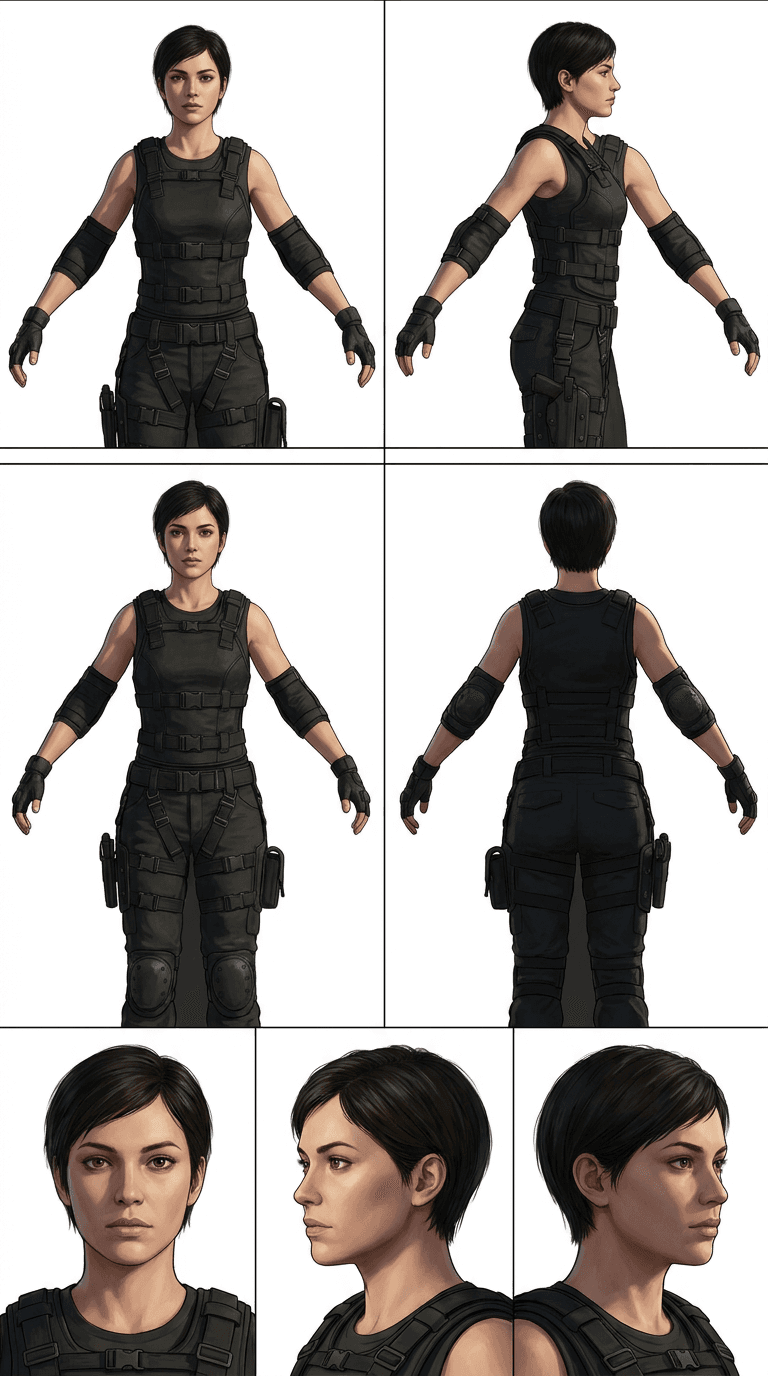
How to create a Character Reference Sheet image
The prompt
Generate a professional character model reference sheet faithful to the uploaded reference image. Place the subject against a clean, solid white background and present the layout as a technical turnaround sheet, matching the reference exactly in realism level, rendering style, surface texture, color grading, and overall aesthetic. Arrange all panels in two horizontal rows with even spacing and crisp separation between each panel. Top row — four full-body standing views, left to right: front view, left-profile view (subject facing left), right-profile view (subject facing right), back view. Hold the subject in a relaxed A-pose throughout. Maintain consistent scale, alignment, and head height across all four panels; ensure accurate anatomy and a clear, readable silhouette in every view. Bottom row — three large, highly detailed portrait close-ups aligned directly beneath the full-body panels, left to right: front portrait, left-profile portrait (subject facing left), right-profile portrait (subject facing right). Keep facial scale uniform across all three portraits. Identity consistency: every panel must depict the same individual with no drift in facial features, proportions, or costume details. Lighting: single consistent light source direction, intensity, and softness across all seven panels. Natural, controlled shadows that preserve surface detail without introducing dramatic mood variation. Output: sharp, print-ready resolution with clean panel edges and a white background throughout.
How it works
- 1Tweak the prompt or pick a different model.
- 2Hit Generate — your image renders in seconds.
- 3Drop it straight into a video.