
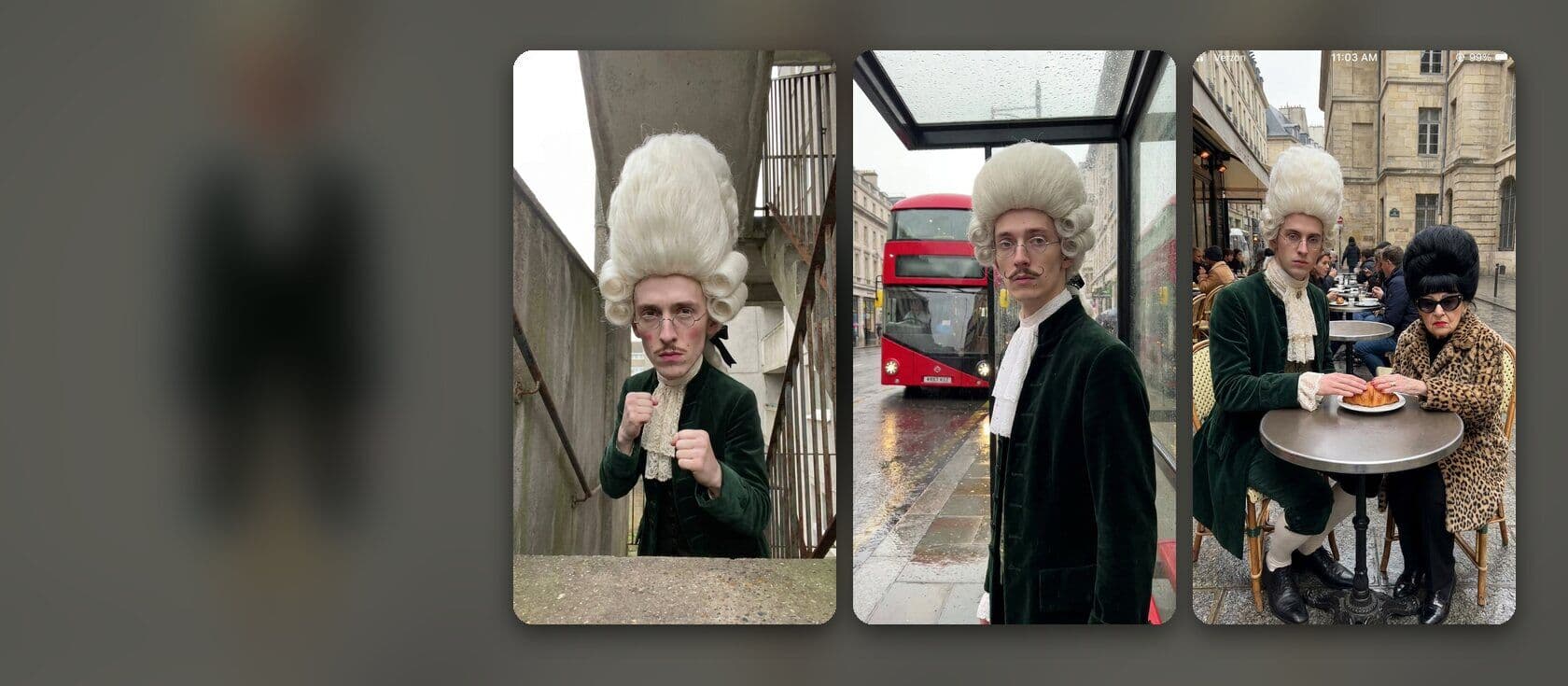
Keep a character the same in every video
A recurring character turns single videos into a series people follow. In the AI character accounts we measured, posts with the account’s usual character got 1.2× the usual views, and posts without it got 0.7×.
Words drift, pictures hold
A description in words gives a slightly different face, hair and outfit every time. Consistency comes from a picture. Make the character once as an image, save it, and use that image as the reference for every new frame. The agent builds each scene’s first frame by placing the character in the new setting, so the face stays and the room changes.
Design for one glance
Give each character one feature you can read at thumbnail size, and never change it: a powdered wig three times the size of his face, a leopard coat and a red bingo dabber, one chip in a seagull’s beak. Keep the outfit the same in every video. The most-viewed AI character we studied wore the same tweed suit and striped tie in every post.
Make and save the character
Type: “A full-length character portrait: Sir Reginald, a thin young man in an 18th-century green velvet coat and a white cravat, with a powdered white wig three times the size of his small face, deadpan. Plain grey background.” For more angles: “A character sheet of Sir Reginald: front, side and back, same outfit.” Then save the image as a character from its menu in the chat, or on the project’s Characters page. A character belongs to the project, so every video in it can use him.
Use the character in a scene
Type @ in the chat and pick the character, then describe the scene: “@Sir Reginald stands at a London bus stop in the rain, a red double-decker behind him, completely still.” The agent makes the start frame from his image, then the clip. Make one frame per scene in its own setting: reusing one frame as the start of every scene makes every scene look the same.
Lock what drifts
In longer prompts, name the things that tend to change and say they stay: the sunglasses stay on, the hat stays on, the wig stays white. With several characters in one shot, name each one so the agent uses each one’s image. A cartoon or 3D character always needs its image: a description of a cartoon in words comes back as a lookalike.
Pitfalls
Changing the outfit for a joke and losing the character. Real people as characters: their faces are not yours to use. A scene with the character made from text alone: it will be a different person.
Frequently asked
Why does my character look different each time?
The scene was made from words alone. Start each scene from the saved character image, and keep the outfit and the description the same.
Can I have several recurring characters?
Yes. Save each one as its own character and name them in the scene. Two characters together often do best: in our research, couple dances and feuds between characters beat solo posts by a wide margin.